
Why This Exists
PIFster's community giving model depends on a steady pipeline of charity candidates for the monthly vote. We don't want to be the sole gatekeepers of which charities appear — the community should surface causes that matter to them.
But an open suggestion form on the internet is an invitation for abuse. The design challenge: make it frictionless enough that a visitor suggests a charity in 30 seconds, but resilient enough that bots and bad actors can't flood the system.
Architecture Overview
The system has five components:
- Shortcode — renders the form HTML (server-side PHP)
- Typeahead JS — debounced search with local caching and race condition handling (vanilla JS, no framework)
- Search API —
GET /pifster/v1/suggestion/searchqueries two tables with prefix-first matching and popularity ranking - Submit API —
POST /pifster/v1/charity/suggestwith UPSERT semantics, fingerprint idempotency, and multi-layer rate limiting - NormalizationService — shared PHP service that standardizes charity names for consistent matching
Lookahead Search: Prefix-First with Popularity Ranking
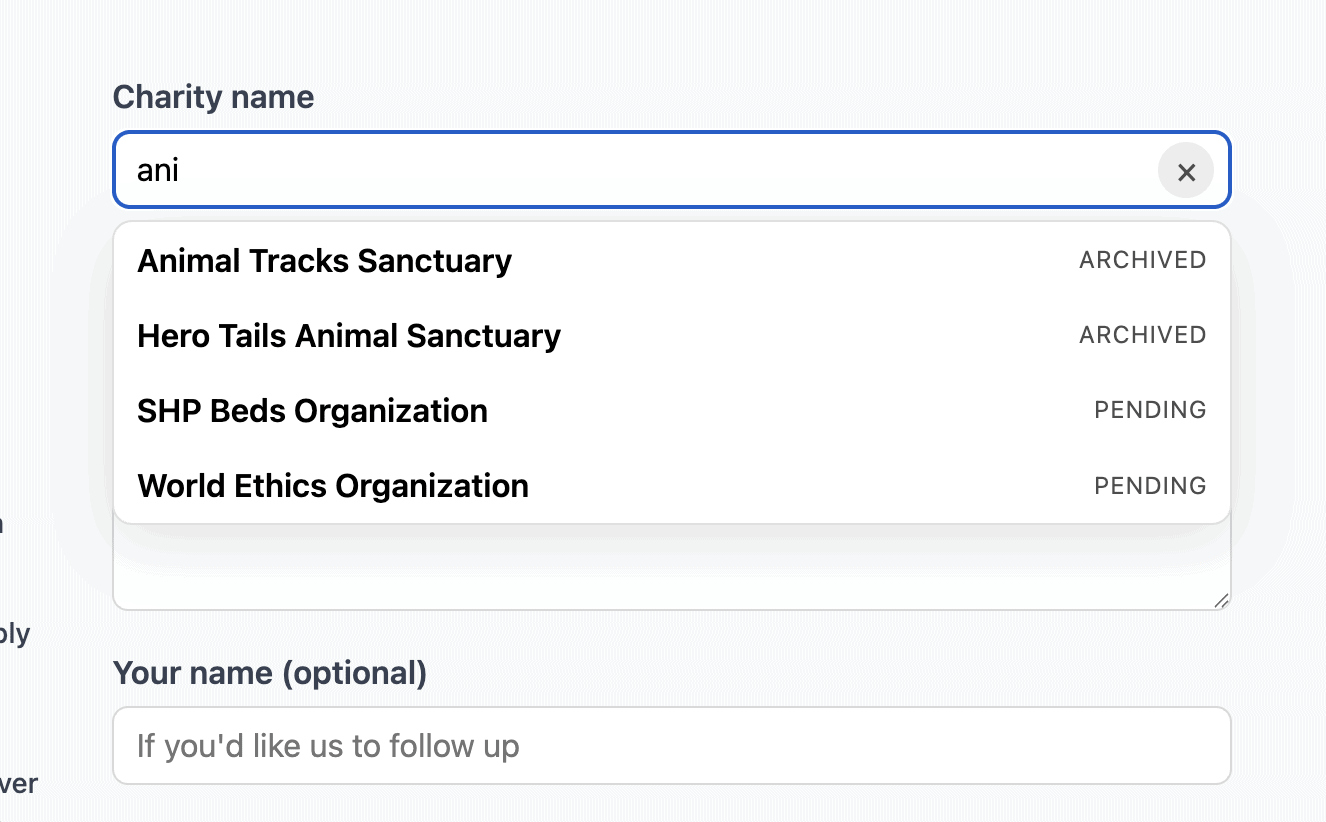
The lookahead search needs to feel instant. When a user types "habi", they should see "Habitat for Humanity" before they finish the word.
Two-Phase Search Strategy
For each data source (charities and suggestions), we run a prefix match first, then fall back to a contains match only if we haven't filled the result limit:
private function searchSuggestions(string $q, string $normalized, int $limit): array
{
    $prefixRows = $this->fetchSuggestionRows($q, $normalized, $limit, true);
    $rows = $prefixRows;
    if (count($prefixRows) < $limit) {
        $remaining = $limit - count($prefixRows);
        $rows = array_merge(
            $rows,
            $this->fetchSuggestionRows($q, $normalized, $remaining, false)
        );
    }
    // ... map to response items
}
The buildLikePattern method controls the difference:
private function buildLikePattern(string $value, bool $prefixOnly): string
{
    $escaped = $this->db->esc_like($value);
    return $prefixOnly ? $escaped . '%' : '%' . $escaped . '%';
}
Prefix matches are faster (can use indexes) and more relevant. Contains matches catch cases where the user types a word that appears mid-name. Running prefix first means you only pay the contains cost when you need more results.
Dual-Table Search with Deduplication
The search queries two tables simultaneously:
pifster_charity— charities already in the system (current, staged, archived)pifster_suggestion— previously suggested charities (pending, approved, rejected)
Results are merged with charities taking priority:
$seen = [];

foreach ($charityItems as $item) {
    $norm = $item['normalized_name'];
    if (!isset($seen[$norm])) {
        $items[] = $item;
        $seen[$norm] = true;
    }
}

foreach ($suggestionItems as $item) {
    $norm = $item['normalized_name'];
    if (!isset($seen[$norm])) {
        $items[] = $item;
        $seen[$norm] = true;
    }
}
If "Habitat for Humanity" exists in both tables, the official charity entry wins. The user sees the status badge ("current", "archived") so they know this charity is already on the platform.
Popularity Ranking
Suggestions are sorted by suggestion_count_unique DESC — the number of unique visitors who've suggested the same charity. Frequently-suggested charities bubble to the top of the autocomplete, giving the admin team a signal about community demand:
ORDER BY suggestion_count_unique DESC, suggested_name ASCCharities (already vetted) sort alphabetically. The popularity ranking only applies to the suggestion pool, where it acts as a lightweight voting mechanism before the charity even enters the formal voting pool.
Name Normalization
Both tables store a normalized_name alongside the display name. The NormalizationService ensures "Habitat For Humanity" and "habitat-for-humanity" resolve to the same key:
final class NormalizationService
{
    public function normalize(string $name): string
    {
        $name = trim($name);
        $name = strtolower($name);
        $name = preg_replace('/[^a-z0-9\s-]/', '', $name) ?? '';
        $name = preg_replace('/\s+/', ' ', $name) ?? '';
        $name = str_replace(' ', '-', $name);
        return $name;
    }
}
The JS side mirrors this logic for local cache keys:
function normalizeName(value) {
    var name = String(value || '').trim().toLowerCase();
    name = name.replace(/[^a-z0-9\s-]/g, '');
    name = name.replace(/\s+/g, ' ');
    name = name.replace(/ /g, '-');
    return name;
}
Transient Caching
Search results are cached for one hour using WordPress transients:
$cacheKey = 'pif_suggestion_search_v2_' . md5($normalized . '_' . $limit);
$cached = get_transient($cacheKey);
if (is_array($cached)) {
    $response = new WP_REST_Response(['items' => $cached, 'cached' => true], 200);
    $response->header('Cache-Control', 'public, max-age=3600');
    return $response;
}
This matters because typeahead generates many requests per user session. A cache hit avoids the UNION queries entirely.
The Frontend: Vanilla JS Lookahead Search
No React. No npm. No build step. The entire lookahead search is ~490 lines of vanilla JS wrapped in an IIFE.
Debounced Search with Race Condition Protection
The search fires on every keystroke, debounced to 180ms. Three layers protect against stale results:
var doSearch = debounce(function () {
    var q = nameInput.value.trim();
    resetSelection();

    if (q.length < 3) {
        abortInflightSearch();
        setLoading(false);
        closeResults();
        return;
    }

    // Local cache check
    var normalizedKey = normalizeName(q);
    if (localCache[normalizedKey]) {
        setLoading(false);
        renderResults(localCache[normalizedKey]);
        return;
    }

    // Abort previous in-flight request
    if (inflight && typeof inflight.abort === 'function') {
        inflight.abort();
    }

    var ac = new AbortController();
    inflight = ac;
    searchRequestId += 1;
    var requestId = searchRequestId;

    setLoading(true);

    requestJson(url, { signal: ac.signal })
        .then(function (r) {
            if (requestId !== searchRequestId) return;
            setLoading(false);
            localCache[normalizedKey] = r.body.items;
            renderResults(r.body.items);
        })
        .catch(function () {
            if (requestId !== searchRequestId) return;
            setLoading(false);
            closeResults();
        });
}, 180);- AbortController — cancels the previous fetch when a new keystroke arrives
- Request ID counter — even if a stale response somehow arrives, the ID mismatch causes it to be ignored
- Local cache — if the user backtracks to a previously-typed query, results render instantly without a network request
Loading State with Spinner Delay
The loading spinner appears after 120ms, not immediately. This avoids the "flash of spinner" on fast connections:
function setLoading(isLoading) {
    if (isLoading) {
        loadingTimer = setTimeout(function () {
            autocompleteWrap.classList.add('is-loading');
        }, spinnerDelayMs);
        return;
    }
    clearTimeout(loadingTimer);
    autocompleteWrap.classList.remove('is-loading');
}
Small detail, big UX difference. If the response returns in under 120ms (common with transient caching), the user never sees a spinner at all.
Result Selection
When a user clicks a result, the form auto-populates and shows a contextual hint if the charity already exists:
selected = {
    post_id: btn.getAttribute('data-post-id'),
    charity_name: btn.getAttribute('data-name'),
    charity_url: btn.getAttribute('data-url'),
    charity_status: btn.getAttribute('data-status'),
};

nameInput.value = selected.charity_name;
if (selected.charity_url && urlInput) {
    urlInput.value = selected.charity_url;
}

if (selected.charity_status) {
    setHint('This charity already exists (' + selected.charity_status
        + '). Submitting will register renewed interest.');
}
The Submit: Four Layers of Bot Protection
An unauthenticated public form is a bot magnet. We stack four defenses:
1. Cloudflare Turnstile
Turnstile is Cloudflare's invisible CAPTCHA replacement. The widget renders in the form, generates a token client-side, and the server verifies it. The submit button stays disabled until Turnstile passes, so humans don't encounter friction — but bots without a browser can't generate a valid token.
2. Honeypot Field
A hidden "website" field that's invisible to human users but tempting to bots that auto-fill all form fields:
<div class="pifster-charity-suggest__honeypot" aria-hidden="true">
    <label for="pifster-website">Website</label>
    <input type="text" id="pifster-website" name="website"
           tabindex="-1" autocomplete="off" />
</div>
The CSS pushes it off-screen. Screen readers skip it via aria-hidden. Only bots fill it.
3. Fingerprint-Based Idempotency
Each submission generates a fingerprint hash from the visitor's IP, user agent, and accept-language header, salted with a WordPress secret:
private function buildFingerprintHash(string $clientIp): string
{
    $ua = (string) ($_SERVER['HTTP_USER_AGENT'] ?? '');
    $al = (string) ($_SERVER['HTTP_ACCEPT_LANGUAGE'] ?? '');
    $salt = wp_salt('pifster_suggest');

    return hash('sha256', $salt . '|' . $clientIp . '|' . $ua . '|' . $al);
}
The events table has a UNIQUE(normalized_name, fingerprint_hash) constraint. Same visitor, same charity = no duplicate count. The ON DUPLICATE KEY UPDATE refreshes the timestamp without incrementing:
$isNewUnique = ($this->db->rows_affected === 1);
$inc = $isNewUnique ? 1 : 0;
This means suggestion_count_unique accurately reflects distinct visitors, not repeat submissions.
4. Multi-Layer Rate Limiting
Five rate limit buckets using WordPress transients:
$ipShortMax = 12;   // Max 12 per IP in 5 minutes
$ipDayMax = 60;     // Max 60 per IP in 24 hours
$fpShortMax = 6;    // Max 6 per fingerprint in 10 minutes
$fpDayMax = 25;     // Max 25 per fingerprint in 24 hours
$topicDayMax = 25;  // Max 25 per charity name in 24 hours
The topic-level limit prevents a coordinated campaign from artificially inflating a single charity's suggestion count. Using transients rather than a dedicated rate limit table keeps the implementation simple — they auto-expire.
The Data Model: Topics vs. Events
The suggestion system uses two tables:
pifster_suggestion (the topic table) — one row per unique normalized charity name. This is the aggregate: display name, URL, reason, status, and suggestion_count_unique.
pifster_suggestion_events — one row per unique (charity, visitor) pair. This is the raw event log, used for idempotency and forensics.
The split lets you query the topic table cheaply for autocomplete (it's small and indexed) while keeping full event history for rate limiting and admin review. The UPSERT on the topic table means a new suggestion either creates a row or increments the counter:
INSERT INTO pifster_suggestion (post_id, normalized_name, suggested_name, ...)
VALUES (%d, %s, %s, ...)
ON DUPLICATE KEY UPDATE
    suggestion_count_unique = suggestion_count_unique + %d,
    last_suggested_at = VALUES(last_suggested_at)
Each topic also gets a WordPress CPT post (pifster-suggestion) so admins can manage suggestions through the standard WordPress admin interface.
The Shortcode: Server-Side Rendering
The form is rendered by a WordPress shortcode, not built client-side. Drop [pifster_charity_suggest_form] on any page. The JS bootstraps from a localized config object:
$bootstrap = [
    'suggestEndpoint'  => esc_url_raw(rest_url('pifster/v1/charity/suggest')),
    'searchEndpoint'   => esc_url_raw(rest_url('pifster/v1/suggestion/search')),
    'nonce'            => wp_create_nonce('wp_rest'),
    'turnstileSiteKey' => $turnstileSiteKey,
];

wp_localize_script('pifster-charity-suggest', 'PIFSTER_CHARITY_SUGGEST', $bootstrap);
No build step. No bundler. The JS reads window.PIFSTER_CHARITY_SUGGEST on load and wires everything up.
Tips If You're Building Something Similar
- Always normalize before comparing. If you skip normalization, "Red Cross" and "red cross" and "Red-Cross" become three different suggestions. The NormalizationService is 40 lines and prevents a class of bugs.
- Prefix search first, contains second. The two-phase strategy gives you relevance (prefix matches are almost always what the user wants) with completeness (contains catches mid-name matches). It's two queries instead of one, but the prefix query usually fills the limit.
- Cache aggressively on search. Typeahead generates 5–10 requests per user interaction. A one-hour transient cache with a
Cache-Controlheader means most of those are cheap. - Don't trust the client — but don't punish the user. Turnstile + honeypot + fingerprint + rate limits is four layers. Any single layer can be bypassed; all four together make automated abuse expensive. But none of them add visible friction for a real human.
- UPSERT with unique counts. The
ON DUPLICATE KEY UPDATEpattern with a conditional increment gives you accurate popularity data without a separate aggregation job. - Separate topics from events. The topic table stays small (one row per charity) and fast for autocomplete. The events table grows but is only queried for rate limiting and admin review. Different access patterns, different tables.
PIFster is a community-driven charitable giving platform where donors vote on which charity receives the community's pooled donations each month. Want to suggest a charity? Use the form. Want to see how the rest of the platform works? Check out our posts on pay-what-you-want checkout, magic link authentication, gift memberships, and gamified referrals.